


When my mother recently read a news article about how smart glasses can record everything around us, she sounded alarmed. I can imagine how deeply privacy concerns can affect you, especially as a woman, and her reaction made me pause and reflect.
I have been wearing smart glasses with a built-in camera, and this has made me more cautious about what to capture and what not to capture in public spaces. Sometimes, I wonder whether smart glasses, originally meant to make us less dependent on smartphones, have strayed from their promise because of the privacy concerns they raise and their chunky form factor. However, I was pleasantly surprised when I started using the Even Realities G2, smart glasses from a Chinese upstart. They look like regular glasses (I call them my “Steve Jobs glasses”) and, importantly, come without cameras or speakers and don’t harvest user data.

But the Even Realities G2 are quite different from Meta Ray-Ban glasses. They feature a waveguide-based heads-up display built into the frames, offering an entirely new experience so discreet that nobody would even guess you are wearing smart glasses. I’m not yet ready to ditch my smartphone for the G2 glasses, but they offer a glimpse of what it’s like to use smart glasses daily and what a small optical display can do.
Here’s my review of the Even Realities’ G2 smart glasses.
What: Even Realities G2| Price: $599 (Rs 57,004)
A lightweight design make them comfortable to wear
I have worn prescription glasses since Grade 3, and over the years, I have tried different types with distinct designs. I can’t imagine my life without them. Glasses not only give me a sense of identity, but as a creative person who loves experimenting, I also have an affinity for both classic and unconventional designs, shapes, and colours.
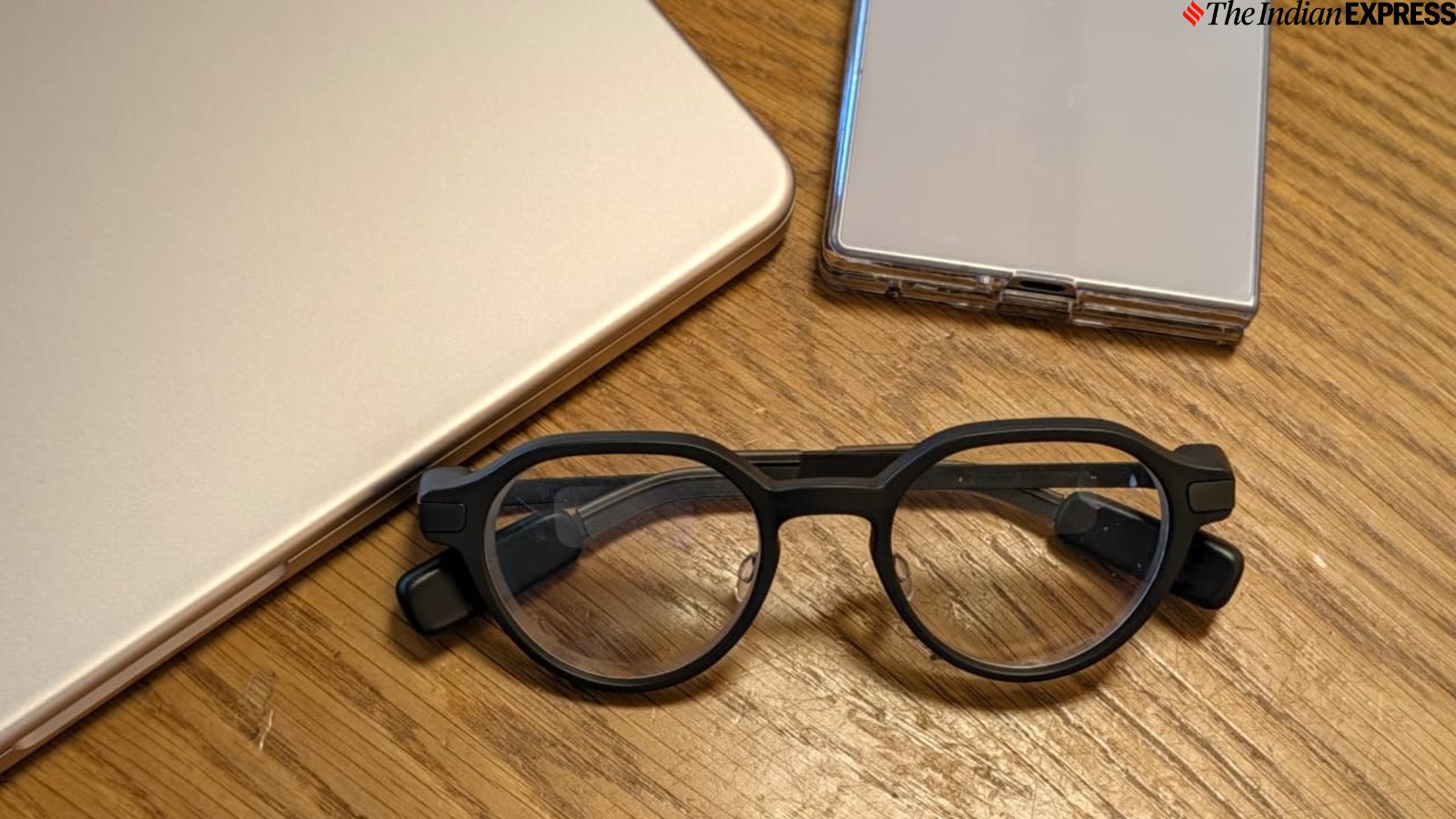
When I first wore the Even Realities G2, I found them tastefully designed. Their round lenses reminded me of the iconic glasses Steve Jobs used to wear. They look like a fashion accessory, blending a modern aesthetic with a clean, minimalist design. In fact, when I asked my friends and colleagues, they couldn’t tell that these were smart glasses. I could easily imagine a lead scientist wearing them in a sci-fi movie lab.
 The glasses’ bright, monochrome Micro-LED display is ideal for discreetly showing text information. (Image credit: Anuj Bhatia/Indian Express)
The G2s aren’t the kind of attention-seeking glasses that designer labels sell these days. They are geek glasses through and through. Made from titanium and magnesium, they are lightweight and comfortable, weighing just 40 grams. Even after wearing them all day, I felt no fatigue or irritation.
Story continues below this ad
As I mentioned earlier, the G2s don’t look like smart glasses, but they are. If you look closely, you will notice that while the technology is virtually invisible, it is housed in capsules built into the temple tips, which contain the electronics and touch controls (more on that a bit later).
The G2s have an IP65 rating, making them dustproof and water-resistant enough to handle rain and light rinsing. However, don’t submerge them or expose them to high-pressure water.
The G2s aren’t the kind of attention-seeking glasses that designer labels sell these days. They are geek glasses through and through. Made from titanium and magnesium, they are lightweight and comfortable, weighing just 40 grams. Even after wearing them for an entire day, I experienced no fatigue or irritation.
As I mentioned earlier, the G2s don’t look like smart glasses, but they are. If you look closely, you will notice that while the technology is virtually invisible, it is housed in capsules built into the temple tips, which contain the electronics and touch controls (more on that a bit later).
Story continues below this ad
The G2s have an IP65 rating, making them dustproof and water-resistant enough to handle rain and light rinsing. However, they shouldn’t be submerged or exposed to high-pressure water.
A monochrome display makes all the difference
What sets the G2s apart is their built-in display. Instead of a full-colour screen, they feature a monochrome green micro-LED display with a 640×350 resolution, a 27.5-degree field of view, and peak brightness up to 1,200 nits. Remember the old CRT TVs that displayed green text? The G2s use a similar monochrome green display, combined with waveguide optics in a binocular setup that allows both eyes to see the image.
While the resolution may underwhelm some users, I found the display effective for quick glances at text and navigation arrows. The waveguide display delivers sharp visuals, but the glasses need to sit precisely on your nose. The company sent me customised glasses tailored to my vision. At first, I feared I would need to reposition them often to bring the display back into focus, but fortunately, I didn’t have any issues.
 The Even Realities G2 (left) next to the Meta Ray Ban Gen 2 (right) glasses. (Image credit: Anuj Bhatia/Indian Express)
Once you put on the glasses and complete the setup through the app, you will see a tile-based dashboard, with the clock and battery levels on one side and a scrollable panel of news, calendar updates, and health data on the other.
Story continues below this ad
You navigate the interface using a series of taps and swipes on the touchpads built into the glasses’ temples. It took me a couple of hours to get the hang of the controls and become comfortable using them. However, I feel the execution could be better. While the controls are responsive and generally work well, I occasionally noticed some sluggishness and had to tap repeatedly to ensure my inputs were registered. This shows that companies are still experimenting with smart-glasses interfaces and working to get the controls right.
The company also sells the R1 ring separately for $249. It does solve the problem by mirroring the same tap-and-swipe controls but placing them next to your thumb instead of behind your ear. This makes using the G2 in everyday life feel more natural.
Once you put on the glasses and complete the setup through the app, you will see a tile-based dashboard, with the clock and battery levels on one side and a scrollable panel of news, calendar updates, and health data on the other.
You navigate the interface using a series of taps and swipes on the touchpads built into the glasses’ temples. It took me a couple of hours to get the hang of the controls and become comfortable using them. However, I feel the execution could be better. While the controls are responsive and generally work well, I occasionally noticed some sluggishness and had to tap repeatedly to ensure my inputs were registered. This shows that companies are still experimenting with smart-glasses interfaces and working to get the controls right.
Story continues below this ad
The company also sells the R1 ring separately for $249. It does solve the problem by mirroring the same tap-and-swipe controls but placing them next to your thumb instead of behind your ear. This makes using the G2 in everyday feel more natural.
Slick interface and app support
The G2s connect to your Android or iOS smartphone through the Even app, making Bluetooth pairing easy. As I mentioned earlier, the glasses feature a simple interface. The UI centres on a multi-tab dashboard that displays information and a pop-up menu that gives you access to active features. The dashboard appears when you double-tap the touch strip, while the heads-up display can be adjusted to an angle between 0 and 60 degrees.
I would say the interface has a Nothing-esque feel, reminiscent of the London-based company that is bringing a sense of coolness to tech products. It’s fun, creative, and functional. The dashboard is a multipurpose panel that displays information such as news, stock prices, and calendar updates.
In total, it features eight main functions: Notifications, Conversate, Teleprompt, Translate, Navigate, Even AI, Dashboard, and Silent Mode. You can also customise which of these functions appear on the dashboard through the app. Swiping back and forth switches between these views, while tapping expands them to reveal more information. Double-tapping returns you to the default dashboard from any expanded view or puts the display to sleep.
Story continues below this ad
 The G2’s frames are constructed from titanium and magnesium. (Image credit: Anuj Bhatia/Indian Express)
When I tried the Meta Ray-Ban Display, a pair of smart glasses with a built-in colour display, I didn’t like the interface. It felt straight out of the feature-phone era. While the G2 lacks a colour display and uses a monochrome one instead, I actually preferred its interface because it is designed specifically for a monochrome display.
The real question is: How well does the monochrome display work, what can you do with these smart glasses, and can they replace your smartphone?
These glasses are definitely far from replacing my smartphone, but they do offer a level of convenience similar to what the Apple Watch and other smartwatches offered in their early days.
There are multiple use cases for the G2 smart glasses. First, the glasses display real-time phone notifications, since they stay connected to your smartphone throughout the day. While this feature can be useful at certain times, I don’t always find it necessary. I dislike receiving notifications on companion devices, whether it’s a smartwatch or smart glasses. Notifications tend to increase my anxiety, especially when I am at work, writing a story, or meeting someone. In such moments, I prefer to stay focused and engaged without notifications interrupting my workflow or ruining the mood.
Story continues below this ad
Perhaps the best use case for the G2 glasses is a feature called Conversate. It transcribes conversations in real time, uses AI to summarise them, and provides relevant context. While the AI summaries work well for general conversations, they can sometimes struggle with technical terms and product names.
For example, while testing Conversate, I was watching a commercial for Apple’s newly released HomeView. At the beginning of the commercial, someone asks Siri, Apple’s voice assistant, whether French toast was invented in France. Siri responds that it wasn’t invented in France and has no direct connection to the country. The G2’s AI feature picked up on this conversation and noted that French toast was named after an American man, Joseph French, who supposedly created the dish in 1724 and advertised it as “French Toast”.
I found the live captioning reliable for everyday conversations, although I encountered a few errors during my tests. In those situations, smart glasses have an advantage over pulling out your phone. While I have had the G2 glasses for several months, the company has made the feature even more useful by adding Prep Notes. This feature lets users upload documents before meetings so relevant keywords and fact-checks appear on the display in real time.
Meanwhile, the Teleprompt feature, as the name suggests, is great for delivering presentations. It works flawlessly, displaying a scrolling text overlay that follows your voice. It is an excellent example of how a monochrome heads-up display can be particularly useful for certain use cases.
Story continues below this ad
 The main on-glasses interface is a tile-based dashboard. (Screenshjot on the app taken on the Samsung Galaxy Note 8)
Then there’s the Translate feature, which supports over 33 languages, including Hindi. While the translations are fast enough to keep up with natural conversations, you still have to manually select the input and output languages in the app rather than relying on automatic detection.
The weakest feature, in my opinion, is Navigation, although I admit I liked it during a hands-on demo earlier this year. The navigation interface is straightforward, with an easy-to-read map, directional arrows, and turn countdowns. However, I found the turn-by-turn directions less accurate, making the feature less practical than Google Maps.
The glasses feature a built-in voice assistant called Even AI. While it works, I wasn’t entirely convinced by its performance. At times, it misinterpreted my requests and struggled to activate or recognise voice commands in noisy outdoor environments, despite having four microphones.
It took me longer to review the G2 glasses because I was waiting for the Even Hub platform to arrive. I see Even Hub as a third-party app store that allows developers to build and distribute apps for the G2 using web technologies. These plugins add more features and functionality to the smart glasses, expanding their capabilities beyond the built-in tools. Several apps are available, including Whoop Glance, which brings data from a WHOOP band to the glasses, and OcuClaw, which brings agentic AI capabilities to the platform. There’s also Spotify Lyrics Finder, although it didn’t function as advertised. The Lyric Finder app, which identifies music, failed to recognise any of the songs I tried during my testing.
When I tried the Meta Ray-Ban Display, a pair of smart glasses with a built-in colour display, I didn’t like the interface. It felt straight out of the feature-phone era. While the G2s lack a colour display and instead uses a monochrome one, I actually preferred its interface because it is specifically designed for a monochrome display.
 Am I wearing smart glasses? (Image credit: Anuj Bhatia/Indian Express)
The lack of a camera is a green flag
The lack of a camera is the biggest differentiator between the G2s and other smart glasses, although, at the time of writing this review, Meta has launched new Ray-Ban smart glasses without a camera. There’s a sense of peace when I wear the Even Realities G2 in public spaces, as people don’t seem to feel uncomfortable when I approach them. I felt something was off when I recently wore the Meta Ray-Ban glasses while walking along Fisherman’s Wharf in San Francisco. The G2s don’t have cameras in the first place, but more importantly, their software and interface aren’t designed around a camera. This makes them feel less intrusive and more socially acceptable to wear in public.
The G2s aren’t entirely privacy-proof. Their microphones capture conversations for Conversate, and Even’s AI continues processing transcripts to generate summaries, even when live captions and cues are turned off.
Long battery life
The G2s offer around two days of typical battery life, while my Meta Ray-Ban Gen 2 lasts about four hours. However, if you use the G2 for features such as navigation, Conversate, and Even Hub apps, battery life drops to roughly 12 to 15 hours. The charging case provides around seven additional full charges, making daily charging relatively hassle-free.
 The entire tech is fitted into the temple tip, housing the electronics and the touch controls. (Image credit: Anuj Bhatia/Indian Express)
So, should you buy the Even Realities G2 smart glasses?
The Even Realities G2 glasses don’t come cheap. They are priced at $599 (approximately Rs 57,004) and are available to order through the company’s online store. If you wear prescription glasses, you’ll need to pay an additional $150 for prescription lenses, bringing the total cost to around $750. That’s a lot of money for smart glasses. In comparison, Meta Ray-Ban glasses cost roughly half as much but lack a built-in display. Yes, Meta also offer Ray-Bans with a built-display and that model cost $799 but they lacks prescription glasses.
You may or may not agree with me, but I liked the G2 glasses for what they offer. Sure, they aren’t a replacement for a smartphone, nor are they meant to be. However, over the months I have used the G2s, their software has improved over time and the glasses today are quite different from what they were on day one.
Still, I wouldn’t recommend them to the average person. Instead, these privacy-conscious glasses are aimed at enthusiasts, geeks, and professionals such as artists, designers, and executives who are willing to invest in a premium pair of high-end glasses.
The G2s are an early proof of concept that it’s possible to make sleek-looking smart glasses that not only look and feel good but are functional as well.