


Having reviewed smartphones since the beginning of my career, I can now confidently say that phones have become utterly boring. As a reviewer, I struggle to find anything genuinely interesting to say about them. Even foldables haven’t changed my mind.
Year-over-year hardware innovation has peaked, and brands are mostly recycling the same devices, with minimal effort to introduce new designs or rethink how we use these phones. But there is a subtle shift happening underneath the surface, one that is easy to overlook. Although I wasn’t initially very optimistic about it, I am starting to like how Google is turning its Pixel phones into software-first devices and using AI to create useful features that can actually change the way we experience and use our phones. That’s not to say everything is perfect. Both the new Google Pixel 11 and Pixel 11 Pro XL come with plenty of AI-powered features, and there are hits and misses along the way. The real question is: do we really want AI everywhere, and how much dependence on artificial intelligence is actually a good thing?

What: Google Pixel 11 and Pixel 11 Pro XL| Price: Rs 89,999 and Rs 1,34,999, respectively, for the base versions.
Familiar design and aesthetics
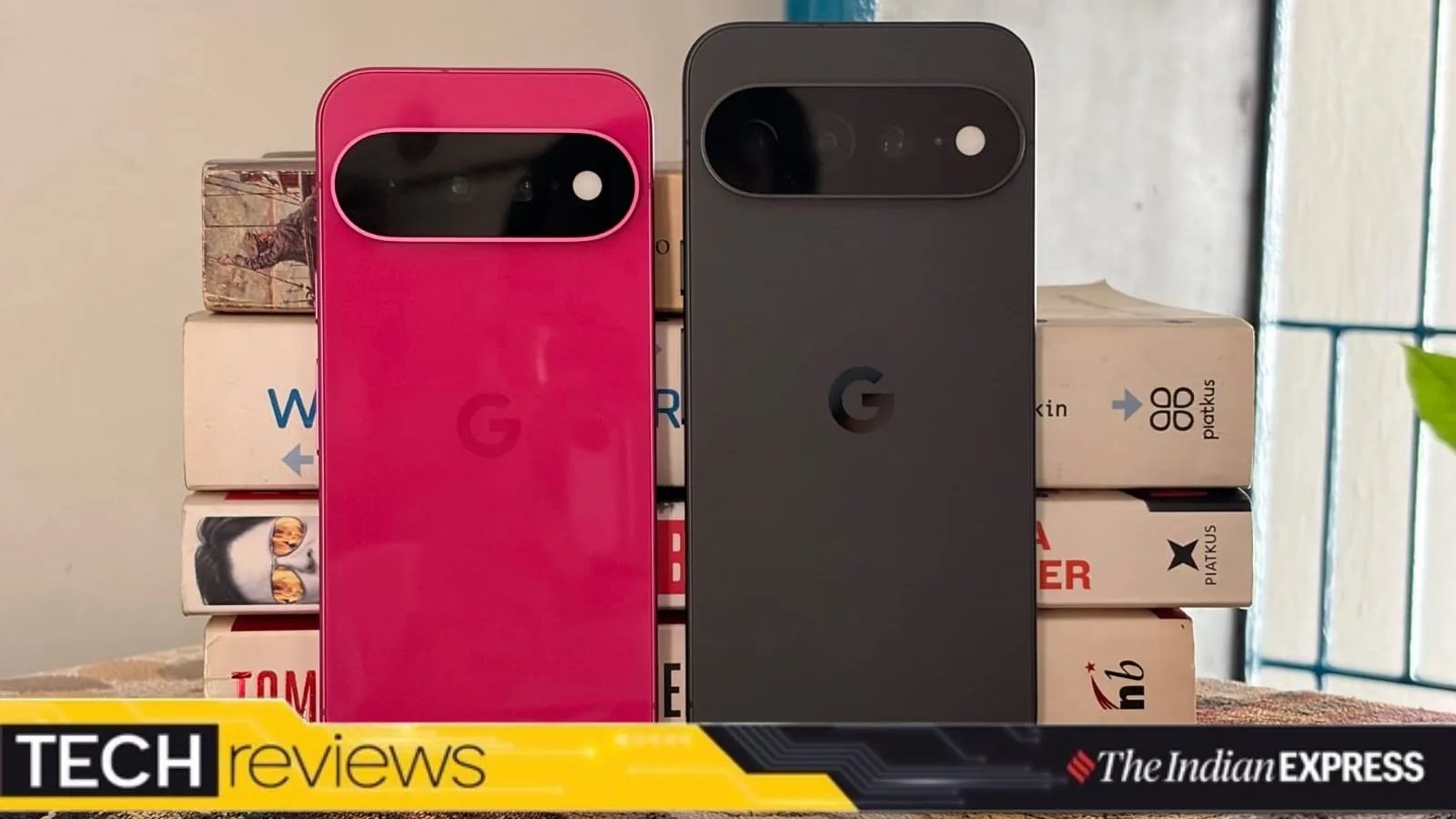
The new Pixel 11 and Pixel 11 Pro XL, which I received for review a few days ago, don’t look much different from their previous-generation devices. Barring the new colour options (I really liked the Pixel 11 in Hibiscus colour) and the redesigned camera bar on the back, which is now fully covered in glass rather than just covering the cameras, and doubles the scratch resistance of the previous one, there are no major design changes worth highlighting.
 I do love my pink Hibiscus Pixel 11. (Image credit: Anuj Bhatia/Indian Express)
It’s the same story with other brands, which leads me to conclude that Google, like its peers, is likely to stick with the same design language for at least three years before making any substantial changes. However, it would have been great if Google had trimmed down the devices and made them slimmer.
That being said, I like how the Pixel phones have a distinct identity and feel premium to the touch. The Pixel 11 is smaller in size and has a compact footprint, making it easy to slip into the tight pockets of a pair of jeans. The Pixel 11 Pro XL, by comparison, is a much larger phone and isn’t as easy to use one-handed as the Pixel 11.
The one thing that still annoys me is the power button placement on Pixel phones. Since I use so many Android smartphones, it’s always odd to use the power button on a Pixel phone, which is above the volume rocker. This is the opposite arrangement to every other Android smartphone I use.
Story continues below this ad
HiLight is a gimmick rather than actually being useful
One of the star hardware features on the Pixel 11 lineup that Google has been marketing heavily is the new HiLight, a notification light that works with Gemini and calls. It’s the big exclusive feature available on the higher-end Pixel 11 Pro XL but missing from the base Pixel 11. Don’t worry, though, you are not going to miss it.
 The HiLight notification light is nothing but a gimmick. (Image credit: Anuj Bhatia/Indian Express)
After using it, I would call it a lazy attempt to mimic Nothing’s Glyph Matrix notification display. Google’s HiLight is meant to make you less dependent on your screen. It’s an LED notification light on the back of the phone that replaces last year’s temperature sensor. The feature lets you keep your phone face down while still receiving subtle alerts via the light.
The light looks cool when it’s active, lighting up in green, yellow, pink, purple, or white. But I find it quite limited, as it only works when you activate Gemini or receive phone calls from your favourite contacts. Weirdly, it doesn’t work when you receive texts or other app notifications. For me, though, the biggest problem with HiLight is the lack of customisation, which isn’t available right now. I would like to see Google continue to improve HiLight and make it more customisable. There is certainly potential here. For example, allowing users to assign different colours to text and WhatsApp messages, or even to individual apps.
Improved displays
The Pixel 11’s 6.3-inch Actua OLED display is familiar but still excellent. The phone may look tiny next to the Pixel 11 Pro XL’s gigantic 6.8-inch display, but I am quite fond of the Pixel 11. The colours pop nicely, and scrolling through web pages and menus is a delight, thanks to the usual 120Hz refresh rate.
Story continues below this ad
 Users get seven years of major OS update and software support for the Pixel 11 series. (Image credit: Anuj Bhatia/Indian Express)
However, it’s the Pixel 11 Pro XL’s maximum brightness that really stands out, with a peak of 3,600 nits. While walking in the morning, I could easily read emails and reply to them, go through the list of stories I was working on, and even read a long-form article in The New Yorker. I had absolutely no trouble making out what was on the display under the bright sunlight.
Not a gaming powerhouse
Both the Pixel 11 and Pixel 11 Pro XL run on the latest Tensor G6 processor. The chip is Google’s proprietary processor, and while it may not be the fastest, I didn’t face any performance issues during my time with either phone. A bit disappointing is that Google is shipping the Pixel 11 Pro XL with 12GB of RAM on the base model, down from 16GB. In comparison, last year’s Pixel 10 Pro XL came with 16GB of RAM. The Pixel series has never had an edge in graphical performance, but with less RAM and a price increase, I can’t help but feel that Google is making the latest Pixel phone less appealing to mobile gamers. Reducing the RAM could further limit its gaming performance, especially in popular demanding titles.
 Google has packed the Pixel 11 Pro XL with a refreshed main sensor and an upgraded 5x telephoto lens that now supports 120x Super Res Zoom. (Image credit: Anuj Bhatia/Indian Express)
Google says reducing RAM doesn’t make much of a difference, since newer phones are faster and smoother than last year’s models, thanks to changes in both the silicon and the software. I wasn’t able to test this claim, as the Pixel 11 Pro XL review unit Google sent me had 512GB of storage and 16GB of RAM.
In general, Pixel phones have never offered the same level of performance as the iPhone or Samsung’s high-end Galaxy smartphones when it comes to gaming. To be clear, the Tensor chip isn’t a weak processor; I find it to be an excellent chip for everyday use. However, users are paying more for these phones, and since Google promises seven years of software updates, I wonder how well the phone will hold up over such a long period.
Story continues below this ad
However, Google has doubled the Pixel 11’s base storage from 128GB to 256GB (the same goes for the Pixel 11 Pro XL), giving users more room for photos, videos, and games. Apple and Samsung have also made similar upgrades, bumping the base storage on their flagship devices from 128GB to 256GB.
Useful AI features
While Google’s hardware game isn’t moving up a notch with this new generation of Pixel phones, its software prowess undoubtedly makes them some of the best AI-focused smartphones on the market. There are a ton of AI features, many of which I don’t use very often. However, there are a few that I have started using, and I have found them interesting and useful. For instance, I would like to highlight Rambler, which has become my favourite feature on the Pixel 11 series. It’s a new AI-powered dictation tool that is smarter in every sense.
 Ramble is a new AI-powered voice-to-text feature that won me over. (Image credit: Anuj Bhatia/Indian Express)
Tap the microphone button in Gboard and start talking; the Pixel will automatically remove filler words such as “um” and “ah” while cleaning up and formatting your speech as you continue speaking naturally. Sure, there are third-party dictation tools available, but Rambler is one AI feature that I find myself using a lot. I can vouch for its voice-to-text accuracy, not just in English but in Hinglish and Punjabi as well. Rambler did a fine job of understanding my broken Punjabi and converting my words into English, even though I can’t read or write Punjabi.
Then there’s the second AI feature on the Pixel that I use a lot: the Pixel Recorder. I use it to transcribe interviews and briefings, and while it may look like a simple recording app, it’s one of the most powerful on-device transcription services available. Best of all, it’s free to use and doesn’t require a subscription. There is also Call Screen, a feature that filters spam and robocalls.
Story continues below this ad
Google is also making changes to Gemini, its AI assistant, which I have been using in my everyday life for a variety of tasks. One of the new features is Proactive Suggestions, designed to surface context-aware suggestions from apps. The idea is that Gemini understands the context and then takes actions on your behalf, without you having to touch your phone or go through multiple steps. I would have used food ordering as an example, but the feature is currently available only in the US and not in India, so I couldn’t test it myself. However, I was able to schedule a meeting at an Airtel store, and Gemini successfully reminded me at exactly 5.30 pm. that I needed to go to the store to replace or transfer my eSIM.
As I said, Google is going all-in on artificial intelligence, and not every feature stands out. I only use a handful of features that simplify my life, but I am also aware that I don’t want to depend on AI for everything, especially when I can use my own creativity and skills to do things that AI can accomplish in a snap. This is where users like you and me need to draw the line and decide exactly when AI can be helpful and when we are overusing it at the expense of the skills we have honed over the years.
Pixel camera take breathtaking photos
I used both the Pixel 11 and Pixel 11 Pro XL cameras, and the latter obviously has better cameras, as it should, given that the Pro XL is the flagship model.
 (Image resized for web)
 (Image resized for web)
 (Image resized for web)
 (Image resized for web)
 (Image resized for web)
 (Image resized for web)
The standard Pixel 11 takes great photos despite packing virtually the same camera setup: a 48-megapixel main sensor, a 13-megapixel ultrawide, and a 10.8-megapixel telephoto lens. However, the photos come out slightly better thanks to sensor improvements and the processing power of the new Tensor G6 chip.
Story continues below this ad
The Pixel 11 Pro XL, on the other hand, is getting substantial camera improvements. It features a 50-megapixel main sensor (1/1.3-inch), a 48-megapixel telephoto camera with 30 per cent more light intake than its predecessor, and a 48-megapixel ultrawide camera with autofocus. It also supports 120x Pro Zoom and the new Instant Night Sight, which enables up to 4.5x faster low-light capture.
If you are coming straight to the Pixel 11 Pro XL, you will absolutely love its camera, since you won’t have the baggage of comparing it with its predecessor. However, I have used the Pixel 10 Pro XL in the past, and I could see visible improvements in the way the Pixel 11 Pro XL’s camera performs. Delhi’s blue skies look much richer and brighter than they did on the Pixel 10 Pro XL, while the camera captures green grass with more warmth and detail. It also does an excellent job of capturing the vibrant colours, fine details, and depth of red roses and white lilies.
I have also noticed notable improvements to Portrait Mode, an area where Pixel phones have struggled in the past.
The Pixel 11 Pro XL takes amazing shots in low light. I like the darkness and tranquillity of an evening walk, and I often step out late so I can capture the moon and the trees in a nearby district park. Night Sight, its low-light photography mode, is now faster, so you don’t have to hold the phone steady for as long, making it easier to avoid blurry photos.
Story continues below this ad
Google’s Pro Res Zoom has been improved on the Pixel 11 Pro XL, increasing the maximum digital zoom from 100x to 120x. I am not a huge fan of super zoom, especially since it uses AI to improve shots, because the extreme zoom levels can still produce shaky or unclear shots.
However, at lower zoom levels, I could take excellent shots of the Sun.
What also impressed me about the Pixel 11 Pro XL’s camera is the new Looks mode. While they essentially work like filters, Google says they alter the phone’s computational photography pipeline. There are four default Looks: Original, Natural, Shadows, and Vanilla, along with additional options such as Editorial, Classic, Digi, Black Tie, and Minimal.
Adding fun to the camera experience is Magic Capture, an AI-powered camera feature that automatically picks key stills from a video. It’s useful for capturing photos and videos simultaneously, though the results can be inconsistent. It worked well for simple moments but struggled with more chaotic scenes.
Story continues below this ad
For creators (everyone is a creator these days), Google is adding a new offering called Creator Suite. This mode can be found in the Video tab of the camera app and includes handy tools such as an audio visualiser, which lets you see whether your wireless mic is picking up your voice. It also includes a built-in teleprompter that detects your speaking cadence and automatically advances to the next line as you speak. I expect many of my colleagues to use the teleprompter mode during the next big product launch event.
Strong battery life
Both the Pixel 11 and Pixel 11 Pro XL easily last a full day on a single charge, and I noticed clear improvements in battery life compared with their predecessors. I never really felt the need to charge either phone in the middle of the day. For the Pixel 11 Pro XL, charging speeds remain unchanged at 45W when using a cable. The Pixel 11 can reach up to 55 per cent charge in 30 minutes with a 30W PPS charger.
 Both the Pixel 11 and Pixel 11 Pro XL easily last a full day on a single charge. (Image: Anuj Bhatia/The Indian Express)
So, should you buy the Pixel 11 and 11 Pro XL?
Google’s new Pixel phones want you to believe that AI is a big deal. But is that what you really want? I will leave it to you to answer that question.
If you ask me, Google seems to have a vision for a phone that could eventually become touchless, with Gemini evolving into its own operating system. There are bits and pieces of that vision in the Pixel 11 series, but it all feels scattered right now. What’s missing is the cohesiveness that brings all these AI features together in one place. I have also observed that not every feature is designed equally, which suggests that even Google doesn’t know which features resonate most with average consumers.
But I can’t help but wonder if smartphones have really peaked. The Pixel 11 series shows just how much phones have matured. The new Pixel 11 and 11 Pro XL are largely the same as previous generations, albeit with better photography, more storage at launch, and a handful of new camera software tricks that could eventually make their way to older Pixel models. They are also more expensive than last year’s models.